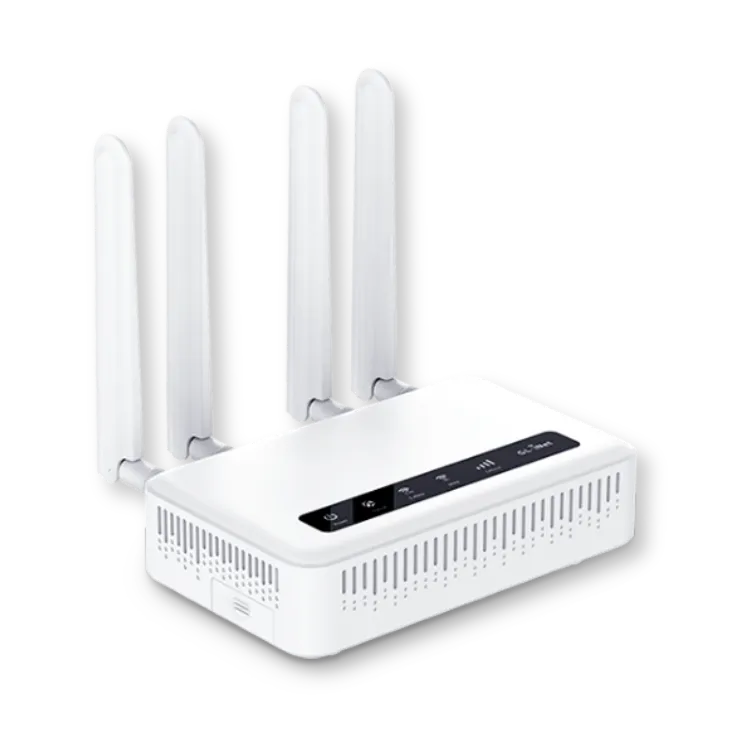
Before you change any settings, you need to log into your router.
► Open a web browser (like Chrome, Safari, or Edge).
► In the top bar (where you type website addresses), type:
192.168.8.1
► Then press Enter on your keyboard.
► If it asks for a username and password:
Username: root
Password: 1234554321
✦ This opens your router’s settings screen, where you can safely make small changes.
These steps help your Wi-Fi run better by choosing the best signal automatically.
► Click the “Modify” button next to your Wi-Fi settings.
► Find the setting that says “Channel”
► Then change it to “Auto."
✦ This helps your router pick the best signal automatically.
This feature lets you (or a helper) access your router safely from anywhere if needed.
► Look for a setting called “GoodCloud” and turn it ON.
► In the region dropdown menu, choose “America.”
► Check “Yes” to agree to the terms.
► Click “Apply” to save.
Make sure your router’s clock is set to your time zone.
► Look for Time Zone settings.
► Click “Sync” to set the time automatically, – OR manually choose “America/Chicago” (Central Time).
► Click “Apply” to save.
Your router is now tuned up and ready to give you the best possible internet. If anything feels confusing or you need help, don’t hesitate to call SilverLink Internet Support at 888-214-4130. We're here to guide you step by step.
If any part of this is confusing or you just don’t feel comfortable doing it yourself, call SilverLink Internet Support at 888-214-4130.
We’re happy to walk you through it!

We are constantly adding new towers. Currently over 94 percent of the U.S. can get service from us. We cannot promise it, but if you live within 5-8 miles of a cell tower, there is a pretty good chance the service will work. We offer a "no-questions asked", full thirty (30) day money-back guarantee, so there is no risk in trying it out.
Once your device has been shipped you should receive it within 2-3 Business Days.
As far as speeds go, that varies per customer depending on their location. Environmental factors such as trees, hills, mountains, etc. can all affect the signal. Metal roofing can be a factor in low speeds. Distance to the nearest tower can play a role. Also, how many people are on that tower in terms of congestion. There is unfortunately no way for us to know what speeds you will get until you try the device. This is why we offer the 30-day money back guarantee. We give all our customers the chance to try the service risk free.
Yes, but you will have to consider doing one or more of the following things:
Move the LTE router to various places inside your home or office to see if it gets faster. Near windows works best. We can also tell you which direction to aim it and if you put it near a window on that side of the house or building, it will help.
Connect an external antenna to the LTE router and fix the antenna to the outside of your house or office. We can supply you with these antennas for an additional one-time charge.
Connect an external LTE radio to the outside of your house or building and run a cable inside to your router. We can supply you with this LTE radio for an additional one-time charge.
Mount the external LTE radio to a tower or high pole and run the cable inside to your router. We can supply you with all of the equipment and parts for an additional charge as well as provide you with a referral to someone in your area who can assist you with installation if needed.
Start-up cost depends on the plan and router you choose.
Our plans start at $55/month* which includes government taxes and compliance fees. If you purchase a 5G router, you'll receive your first month of Internet FREE as part of our Sale + plus, your shipping is free and Programming Fee is Waived on all plans!
There are no hidden fees and no need to bundle—just reliable, affordable internet tailored to your needs.
*New Subscriptions only.
We offer a full 30-day money back guarantee. If you are not satisfied with the service for whatever reason, please give us a call and let us know and we’ll make arrangements for you to send the device back. As long as we receive it back within the initial 30-day period you will be able to get a full refund. If you are experiencing technical issues, please give us a call and our tech support team will be more than happy to assist you.
23705 Interstate 10 W, Suite 209
San Antonio, TX 78257